Showing posts with label usages. Show all posts

Wednesday, August 21, 2013

More Control Options in Lync Optimizer

Introduction

A few long-asked for features in the Lync Dialing Rule Optimizer are the ability to modify the rule naming convention used for dialplans, usages, routes etc and simplified routing.  I haven't done so in the past because I thought that allowing users full control over the naming convention would cause all kinds of issues with the Optimizer code.  A fair amount of the code assumes all the rules follow a certain naming convention for things like least-cost routing to work. For non-North American countries, I've long allowed for the addition of a rule suffix, but the main rule format stayed the same.

The "typical" Lync Dialing Rule Optimizer naming convention starts with a 2-character country code, followed by a 2-character state or province code (North America only), then the city/area name, the numeric area code of the city/area, and finally a suffix denoting the call type (local, mobile, premium, national etc).  So, for Toronto, Ontario, we would have NA-ON-Toronto-416-222-Local (or -National, -Premium etc).  London, UK would be UK-London-20-Local.

I've recently realized that the code only relies on the country name prefix and the call-type suffix for all the code to work properly (a rare bit of foresight coming from this non-programmer).  So, I've made some changes to the Optimizer UI to allow for some new user-controllable settings.

Changing Rule Names

First off, I've extended the Rule example preview that's been available for non-North America countries for some time.  Now for any country, you will see a live preview of what a rule will look like after you've selected any of the options above the example.

If you don't like the default rule naming convention as displayed in the Rule example, you can change it by clicking the checkbox beside Change Rulename Base, and entering your own rule format, as in the below examples:

You'll get real-time feedback on how your rules will look without having to actually generate the ruleset and look through the Powershell output. The Optimizer will still control the country prefix and the -Local, -National etc suffixes as per usual to ensure least-cost routing and other options will still work.

Force English Rulenames

If you're working with a ruleset for a country that doesn't use English for rulenames, you can now click the Force English Rulenames checkbox. This box only appears when you select a country that doesn't already use English for its rulenames. When selected, all rules and descriptions will use English instead of the local language. This replaces the feature that was previously available using a separate (seemingly hard to find) webpage.

Simple Rulesets

I've also added an option to create a simple ruleset that handles all calls instead of the default that breaks up local, national, international, mobile and service numbers into groups so administrators can easily assign different voice policies that limit the types of calls users can make.


For example, a "traditional" Optimizer ruleset for London, UK will create the following usages and routes:
UK-London-20-Local
UK-London-20-Mobile
UK-London-20-National
UK-London-20-International
UK-London-20-Premium
UK-London-20-Service

If a company has a lot of sites, the number of usages and routes grows quite quickly.  Selecting the "Simple Ruleset" option will create the following usage/route:
UK-London-20-AllCalls

The AllCalls rule simply hands every single call off to the next hop. Much less complicated, but there are trade-offs. Least-cost routing between sites is not possible since any call will match the AllCalls usage. Administrators can't limit the types of numbers users can auto-forward calls to (see this post for more information on the topic).

Also, don't attempt to add an AllCalls usage to a "traditional" Optimizer-generated voice policy that prevents certain classes of calls (ie international etc).  For example, assume a user is assigned to the voice policy NA-ON-Toronto-416555-Local, with usages formatted as below:
NA-ON-Toronto-416555-Local
NA-ON-Toronto-416555-Service

When a user dials a number, Lync will check for a match against all the routes in the usages assigned to the voice policy. So, if a user assigned to the Local policy tries to dial a long-distance or international number, Lync will check against the Local then Service usages for a match.  It won't find one, and the user will be denied the call.

The Lync administrator decides to add the UK-London-20-AllCalls usage to the bottom of the NA-ON-Toronto-416555-Local voice policy.
NA-ON-Toronto-416555-Local
NA-ON-Toronto-416555-Service
UK-London-20-AllCalls

Now when the user tries to dial a previously denied North American long-distance number,  the call will match against the UK-London-20-AllCalls usage and allow the call.  To add insult to injury, the call will route via London as an international call, and incur higher toll charges. 

So, the general rule is not to add AllCalls usages with voice policies that intend to limit calls to certain classes of numbers.  The Optimizer won't include AllCalls usages in least-cost routing calculations on "traditional" rulesets.  However, failover routing calculating and application is still available between rulesets that use the AllCalls option.

Conclusion

You can combine all these new features to create a truly customized ruleset for your deployment. So, you're able to create an English language simplified ruleset for Budapest, Hungary using a customized naming convention with just a few clicks.

These most recent UI and functionality changes should go a long way towards helping Lync administrators create rulesets that most benefit their deployment requirements.  Check out version 10.0 of the Lync Dialing Rule Optimizer at www.ucdialplans.com.

As usual, feedback is always appreciated. If there's anything else you'd like to see in the Optimizer, let me know in the comments.


Thursday, August 1, 2013

Forwarding Calls Using Inter-Trunk Routing

A question came up on the Lync Technet forums about how to make Lync 2013 take an inbound PSTN call to a specific Lync number and turn around and send it back out to the PSTN to another number.  Previous to Lync 2013, this wasn't possible unless you setup a response group to take the inbound call and forward it to a different number.

Lync 2013 introduced inter-trunk routing, which allows administrators to route incoming calls to another phone system. While its main intent is to facilitate connections between dissimilar phone systems, it can also be used to forward inbound calls to another external phone number using the same trunk.

Let's assume you have a SIP trunk connected to Lync Server 2013.  You have a phone number associated with Lync and your SIP trunk (+15554447777) that you want to forward to a completely different number not hosted on your SIP trunk/Lync (say +15558880001).  Also, assume that you've already setup dialing rules to normalize everything to E.164 standards.

First, go to your global voice policy and create a PSTN usage.

Create a new route that contains only +15554447777, and assign the route to your SIP trunk.

Now, go over to the Trunk Configuration page and edit your SIP trunk. Add the PSTN usage you created above to the Associated PSTN Usages dialog box:

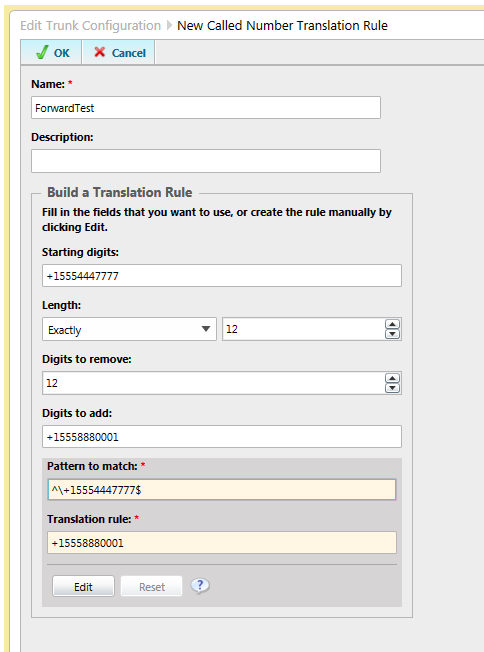
Scroll further down and create a new Called Number Translation Rule. Create a rule that will translate +15554447777 to +15558880001, as shown below:

Commit your changes, and voila! You have now configured administrator controlled call forwarding in Lync 2013.

A few notes:

  • Make sure the number you want to forward is not already assigned to a user, response group or other feature. If it is, this will not work because Lync will check to see if any Lync resource has the number assigned before attempting any other routing.
  • In most cases, SIP trunks don't support REFER, so any calls routed using this manner will use two channels, one for the inbound leg, and one for the outbound leg. The call will be hairpinned through your Lync servers. Be careful before doing this to a lot of phone numbers.
I'm not sure how often this sort of thing would come up, but its nice to know it will work.

Monday, June 24, 2013

Location-Based Routing without Inbound Call Restrictions

The February 2013 Update for Lync Server 2013 (CU1) added location-based routing to the Lync Enterprise Voice featureset. As described on Technet and various other blogs, location-based routing was designed to function in countries where routing calls over the WAN is not allowed.

Countries like India apparently have rather strict telecom laws saying any calls that exit the country must exit via the PSTN.  For instance, imagine your company has a Lync deployment in India and Canada.  As I understand it, if a user sitting in India wanted to call a Canadian PSTN number, it couldn't save on international toll charges by routing the call to Canada via the corporate WAN and exit to the PSTN via the Canadian Lync deployment. The converse situation would also not be allowed.  Whether this is because India wants the international toll charge revenue or for monitoring purposes, I don't know.

Prior to Lync 2013 CU1, companies faced with these requirements would be OK when users never moved from their assigned location.  For instance, if a Canadian user never went to the India office, and the India users always stayed in India, they would never run afoul of the rules. If a Canadian user did travel to India, their Canadian voice policy would still apply (unless the administrator moved the user temporarily to the India Lync server).  Their calls would route over the WAN to the Canadian Lync server, which is not allowed by India telecom rules.

Location-based routing was obviously added to Lync to deal with the "India problem".  You can see this in the Technet documentation on how to setup location-based routing.  All the examples use India, and if you follow the documentation explicitly, you will have an India telecom compliant Lync deployment.  If our hypothetical Canadian user travels to the India office, their calls will use the India Lync deployment, rather than use the WAN for least cost routing.  Inbound calls to the Canadian user's Canadian phone number will go to voicemail, because letting him take the call via the WAN would run afoul of the India dial rules.

So, this got me thinking. What if we want to setup location-based routing, but not worry about whether or not inbound calls can route over the WAN?  I can think of many situations where location-based routing is desirable. Any place where you have lots of mobile people going to different offices can benefit from location-based routing, especially in environments where bandwidth back to the user's home pool is lacking.

Luckily, I'm working on a Lync 2013 deployment that has that exact scenario in mind. The company has many mobile users who travel to far-flung offices with poor WAN conditions.  I wanted to see if we could implement location-based routing for this company, but without the restrictions on inbound call routing imposed if you follow the Technet documentation to the letter.

The documentation has you setting up all your sites and subnets, and then running the following commands (as per http://technet.microsoft.com/en-us/library/jj994036.asp):

  1. New-CSVoiceRoutingPolicy to create the routing policies and the PSTN usages assigned to it
  2. Set-CSNetworkSite to enable location-based routing for the site via -EnableLocationBasedRouting:$TRUE, and to assign the previously created voice routing policy
  3. Set-CSTrunkConfiguration to assign network sites and enable routing restrictions on the PSTN trunk, using -EnableLocationRestriction:$TRUE.
  4. Set-CSVoicePolicy to enable location-based routing for the users assigned to that policy, using -PreventPSTNTollBypass:$TRUE

We setup location-based routing as per the documentation with only ONE key difference...we didn't enable location-based routing on the trunks as per the examples given.  When running Set-CSTrunkConfiguration, we left out the -EnableLocationRestriction:$TRUE setting.

Technet's documentation on this particular setting seems to indicate not setting -EnableLocationRestriction to $TRUE would make location-based routing not work. In actual fact, this is the setting that stops inbound PSTN calls from working while a user is at a site where call routing restrictions apply (like India).

The setting that I THOUGHT would have allowed inbound calls across the WAN to work was Set-CSVoicePolicy -PreventPSTNTollBypass:$FALSE.  This setting is actually the one that controls which users will get location-based routing applied to them.  Setting it to false disables location-based routing for the users of that voice policy, as indicated by the wording on the location-based routing setup page. It does not actually prevent PSTN calls from reaching users over the WAN, as the Technet documentation on the command indicates.

We've tested this setup and it works as we had hoped it would. When users go to remote sites, their outbound calls use the local PSTN egress point, but inbound calls to their PSTN phone number still routes to them properly.

So, in conclusion, if you want to enable location-based routing without inbound call restrictions, don't use Set-CSTrunkConfiguration -EnableLocationRestriction:$TRUE, or conversely, use Set-CSTrunkConfiguration -EnableLocationRestriction:$FALSE if you've already set it to $TRUE.


Tuesday, June 4, 2013

Inter-trunk Routing in Lync 2013

Introduction - What is Inter-trunk Routing?

Inter-trunk routing is a new feature in Lync 2013 that allows Lync Server to be the central call processor for a multi-PBX deployment.  In previous versions, Lync was only capable of being the final destination for phone calls.  If an inbound phone call couldn't be matched to a Lync user, the call would fail.  There was no way to have Lync forward calls on to another PBX, which limited the configuration options available to administrators.

Inter-trunk routing gives Lync administrators the ability to take calls in from a variety of sources and forward them on to other non-Lync destinations if there isn't a matching Lync user with the target phone number. 

The Problem

Recently, I had to deploy inter-trunk routing for a Lync deployment that had calls coming in from a variety of sources to a centralized Lync Server 2013 Enterprise Edition deployment:
  • a Lync-certified SIP trunk
  • a Canada-based T1 line connected to a PSTN gateway
  • two US-based Mitel PBXs. 
The inter-trunk routing requirements were very specific: forward four phone numbers entering Lync from the SIP trunk to one of the US-based PBXs.  The four phone numbers were +1 (289) 555-3926, +1 (289) 555-6733, +1 (289) 555-6734 and +1 (289) 555-6780.

The Solution

Having never done Lync inter-trunk routing, I turned to the trusty Internet for answers.  I found lots of information on WHAT Lync inter-trunk routing was all about, but almost nothing on exactly HOW to configure inter-trunk routing in Lync.  I saw references to assigning PSTN usages to trunks, and saw the place in the Lync Control Panel to add it, but nothing but vague allusions to the process of actually implementing it.

UPDATE 10-June-2013: Richard Brynteson posted a more knowledgable deep-dive into inter-trunk routing mere days after I posted this. I made a slight adjustment to my process based on what I read in his blog, so its definitely worth reading.

As usual, when I come across such a situation, I assume that it must be so simple to configure that it didn't occur to anyone to actually document the HOW.  I then assume I must be a complete idiot for not knowing something so plainly obvious to every other Lync administrator on the planet. So, after much flailing around, I figured out a solution that works using inter-trunk routing.

Since I wanted to route only four specific phone numbers between trunks, I needed to make sure that I enabled inter-trunk routing for those numbers and no others.  If I allowed inter-trunk routing for too wide a range of phone numbers, we could get into a situation where calls could enter Lync, pass onto the target PBX and route back into Lync, causing a call loop.  Rather than leave it to the target PBX to ensure a call loop doesn't happen, I figured it best to ensure Lync only pass the specific numbers to the PBX.

I started by editing the site-level voice policy attached to the Lync site where the incoming SIP trunk calls came into Lync.  I created a dedicated PSTN usage/route combination for those four numbers.  The PSTN usage was called NA-ON-Cooksville-289555-MitelForward to keep with the naming convention used by the Lync Dialing Rule Optimizer.  The route was called NA-ON-Cooksville-289555-MitelForward with a route pattern of ^\+1289555(3926|67(33|34|80))$ pointing to the PBX at 1.1.1.1. 

The PSTN usage was placed at the very top of each voice policy's PSTN usage list to ensure that any Lync user that tries to dial those numbers will forward the calls to the desired PBX. For good measure, I also added the PSTN usage to the Global voice policy, although I'm not sure this is necessary.

Next, I assigned the new PSTN usage to the incoming SIP trunk under Trunk Configuration.  If the trunk doesn't exist, add it as a new pool trunk.  I then added a trunk for the PBX and added trunk translation rules to strip the number down to 5 digits, which is what the target PBX is expecting.

Once done, I committed the changes and waited a few minutes for the changes to bake to a nice golden brown.

The moment of truth came when I was able to call one of those four numbers and listen as Lync seamlessly passed the calls onto the Mitel PBX.  Great success!

Conclusion

I'd like to say it was my deep, Yoda-like knowledge of how call routing works in Lync that allowed me to think through the process of determining how inter-trunk routing works. Unfortunately, the truth is that I tried random combinations of things until I stumbled blindly onto the solution.  There's a reason why I chose that picture of the Hoff looking vacant and stunned at the same time as my avatar....it's how I look and feel much of the time.

To summarize the process:
  1. Create a PSTN usage/route combination that is specific to the phone numbers required to be forwarded to the PBX.
  2. Place the PSTN usage at the top of all voice policies to ensure that both inbound calls from the PSTN and calls made by internal Lync users are routed to the proper destination.
  3. Assign the PSTN usage to the incoming trunk.
When complete, the whole call process should function as follows:
  1. Inbound call comes into Lync via SIP trunk.
  2. Lync normalizes the number into an E.164 phone number
  3. Lync does a reverse number lookup to check for a Lync user with the same number
  4. If no match in Lync, then it looks for a matching usage/route assigned to a trunk
  5. When found, applies any outbound normalization rules and sends the call to the next hop
For a more detailed description on how the call flow will proceed, check out the Mastering Lync blog.  Richard Brynteson did a series on the nitty gritty details behind dialing behaviours in Lync. His post on Inter-trunk dialing is a deep-dive into the details that I don't get into here.

If there's anyone else out there trying to figure out how to implement Lync inter-trunk routing, I hope this helps figure things out.  As always, if you have any questions or can correct any misunderstanding I might have on the process, just leave a comment.

Thursday, January 24, 2013

Limiting Call Forwarding and Simultaneous Ringing in Lync 2013

In Lync 2010, users were able to forward calls or setup simultaneous ringing to any number that they were able to call themselves.  This could lead to people forwarding all their calls to a long distance or even international number (assuming their voice policy allowed international calling).  This can lead to increased telephony costs to the company, and there wasn't very much the administrator could do to control this, short of disabling the feature entirely.
A new feature in Lync Server 2013 Enterprise Voice allows administrators to limit where users are able to setup call forwarding/simultaneous ringing.  You'll see the new option at the bottom of the voice policy screen in Lync 2013 Control Panel (as highlighted in red).

The selectable options are:
Route using the call PSTN usages (default) - essentially means to allow users to forward calls to any destination phone number they are allowed to call (the same behaviour as in Lync 2010).  So if a user is allowed to call international numbers, they will be allowed to forward/simultaneous ring international numbers. The option wording here could really use some improvement, because to me it doesn't make much sense as it currently stands.
Route to internal Lync users only - allows call forwarding/simultaneous ringing only to other Lync users within the company.
Route calls using custom PSTN usages -  allows administrators to limit call forwarding/simultaneous ringing to only the PSTN usages defined by the administrator.

When the last option is selected, the Control Panel will display a box where administrators can select the appropriate PSTN usages.  For instance, to limit call forwarding/simultaneous ringing to only local numbers, select a local PSTN usage, as shown below:

Administrators can add multiple usages to allow calls forwarding/simultaneous ringing to any combination of PSTN usages.  Since voice policies can be applied either globally, site-wide or down to the user level, this should allow administrators to grant different policies to any number of users.

This assumes the Enterprise Voice deployment has been designed granular enough to break out local, national and international calling.  If there is only a single catch-all usage for all calls, then this won't work and the Enterprise Voice configuration will have to be re-designed.

Luckily, the Lync Dialing Rule Optimizer (shameless plug) creates usages for local, mobile, national, premium, and international usages, which should be enough for any administrative need.

Unfortunately from the user's perspective, they won't get a notification in the Lync client if they try to forward/simultaneous ring a phone number that is outside the dialing areas allowed by their voice policy.

For example, assume a user's voice policy only allows forwarding/simultaneous ringing to local numbers. If the user sets up simultaneous ringing to a number outside the local dialing area, they won't get any feedback that it isn't allowed by the policy.  When someone phones the user, their Lync devices will ring as usual, but the simultaneous ring number simply won't ring.  This could generate an unnecessary helpdesk call, which could also confuse the helpdesk, if they haven't been made aware of the policy.

Similarily, the user doesn't get any feedback in the Lync client when setting up call forwarding to a number outside the allowed dialing areas.  In this case, calls will simply go straight to Exchange voicemail without attempting to forward.  However, the user will get an email stating the forwarding isn't allowed.  Slightly more helpful, but still likely to generate a helpdesk call.
Curiously, the interface still refers to Office Communicator, but since I'm still running Exchange 2010, maybe this is to be expected.

The situation would be greatly improved if the Lync client would be more informative in this respect.  In my perfect world, there would be no war, global warming would turn Canada into a tropical paradise, gin and tonic would flow freely from taps all around my house, and the Lync client would provide feedback like this when users try to forward to a number that isn't allowed:

A man can dream, can't he?

Either way, the new control administrators have to limit call-forwarding/simulring is a much needed new feature, and I'm glad it made it into Lync 2013.

Wednesday, January 9, 2013

Least-Cost/Failover Routing in the Lync Dialing Rule Optimizer

The Lync Dialing Rule Optimizer tries to take care of all the Enterprise Voice configuration necessary for all deployments.  On most fronts, it does a pretty good job (IMHO).  One area that has been lacking is the ability to automatically arrange PSTN usages to provide least-cost/failover routing for multi-site Lync deployments. Once an administrator has run the Optimizer for all their sites, they have to manually configure the voice policies to provide least-cost/failover routing.

If you're not familiar with how least-cost/failover routing works in Lync, please refer to my post on the subject in my Lync Enterprise Voice Best Practices series.

With version 9.0 of the Lync Dialing Rule Optimizer, Lync administrators now have the option to create least-cost/failover routing between all sites that have been deployed using the Optimizer (or at least follows the same naming conventions used by the Optimizer).

When the Optimizer-generated script detects multiple Lync sites, it will prompt the user if they want to apply least-cost/failover routing to the voice policy being generated.  If the user allows it, the Optimizer will add PSTN usages for all the other sites to the new voice policies.  This assumes the existing PSTN usages are named with the country abbreviation first, and ends with either Local, National, International etc in any of the languages currently supported by the Optimizer as in the following examples:  UK-Leeds-113-Local, IT-Rome-06-Nazionali.

The output can be best summarized by way of example.  Assume a company has Lync Enterprise Voice deployed in the following locations:
Toronto, Canada
Vancouver, Canada
London, UK
Rome, Italy
Belém, Brazil

After running the Optimizer script against all sites, the PSTN usages for the Toronto International user voice policy would look like this (you might want to sit down for this):
NA-ON-Toronto-416567-Local
NA-BC-Vancouver-604678-Local
NA-ON-Toronto-416567-National
NA-BC-Vancouver-604678-National
NA-ON-Toronto-416567-Premium
NA-BC-Vancouver-604678-Premium
NA-ON-Toronto-416567-Service
UK-London-20-Local
IT-Roma-06-Locali
BR-Belém-91-Local
UK-London-20-Mobile
IT-Roma-06-Cellulari
BR-Belém-91-Celular
UK-London-20-National
IT-Roma-06-Nazionali
BR-Belém-91-Nacional
NA-ON-Toronto-416567-International
NA-BC-Vancouver-604678-International
UK-London-20-International
IT-Roma-06-Internazionali
BR-Belém-91-Internacional


The Optimizer will group PSTN usages from the same country near the top, using the assumption that most of the calls will be made to in-country locations and that the fewer PSTN usages the system needs to evaluate for each call, the better.

The ordering is such that least-cost routing and failover routing will occur.  PSTN usages from other countries will be placed lower in the list while still providing least-cost and failover routing for all calls.  If there are multiple Lync sites out-of-country, the ordering of PSTN usages within the National and International usages will be somewhat random. Administrators should review the PSTN ordering to make sure it suits their needs.

It is assumed that premium numbers can only be dialed from in-country locations, so out-of-country premium PSTN usages are not assigned. Also, only the local service PSTN usage is assigned for similar reasons.

All calls will use the least-cost route where possible. If a route assigned to a specific usage is unavailable, calls will use a route in another site, again keeping the call in-country if possible.

With the inclusion of least-cost/failover routing in the Lync Optimizer, administrators now have a tool that can completely build the Enterprise Voice environment for even the largest enterprise-level Lync deployment.

As always, feedback is greatly appreciated. Let me know if you come across any issues with functionality or scalability as I haven't tested if there is a limit to the number of PSTN usages that can be assigned to a voice policy.


Friday, January 21, 2011

Lync Enterprise Voice Best Practices - Usages and Routes

Over the past while, I've typed some lengthy posts about the importance of E.164 phone number formatting and my take on normalization best practices. Now to pull it all together for the final act, I'll be talking about Lync PSTN usages and routes.

When you look at the Voice Routing section of the Lync Control Panel, you'll see the following "tabs": Dial Plan, Voice Policy, Route, PSTN Usage, Trunk Configuration and Test Voice Routing:

From this section, you can manage most aspects of your Enterprise Voice deployment.


Dial Plans were briefly discussed in my previous post.  A dial plan is a collection of normalization rules that are assigned to sites, pools or users.  Dial plans are designed to allow users to dial phone numbers as they are accustomed to, but still outputs properly formatted E.164 phone numbers, no matter what they type. When you create a dial plan at the site or pool level, all users within that site or pool whose Dial Plan Policy is set to Automatic will be assigned that policy.  There can only be one Dial Plan per site/pool.  If one dial plan is assigned to a site and another one to a pool, the pool-level policy will take precedence.  If you want more granular control, you can create user-level dial plans.  You have to assign users to the user-level Dial Plan policy either through the control panel or via Powershell.

Voice Policies define the capabilities of the users assigned to it. Capabilities can include call transfer and call forward, among others. Capabilities also include the types of calls (local, long distance, international etc) members are allowed to make via PSTN Usages.  Voice policies are assigned to users or sites. Site policies will automatically be named the same as the site, while user policies can be given whatever name suits you.

When you create a voice policy, you have the option to associate PSTN Usages to the policy. If you're just starting out, this list will be blank.

PSTN Usages
PSTN usages are the link between a voice policy and a route. The combination of the three determines the calls a user can make and what route the calls will take.  PSTN usages can contain multiple routes, and can be assigned to multiple voice policies.

You can only create PSTN usages through the Voice Policy interface. When you create PSTN usages within a specific voice policy, it will automatically link to that policy.  You can also create routes from within the PSTN Usage creation dialog box, which makes the whole creation process efficient.

PSTN usage names should relate to calls of the same type: like Local, Long Distance/National, or International. If you've got more than one site where PSTN calls will be made and has a defined PSTN gateway, its best to qualify the usages with site information (you'll see why later). I prefer (and this is the same format used for the Dialing Rule Optimizer):  country-state/prov-city-callclass or country-city-callclass.

Some examples:
NA-ON-Toronto-Local
NA-BC-Vancouver-National
NA-TX-Dallas-International
GB-London-National
IT-Rome-Local
JP-Tokyo-International

I tend to use NA (North America) instead of US and CA, because both countries share the same country code (1). Again, if you have a better scheme, go ahead and use it.  There is no right or wrong way to do this.

Routes
Once the PSTN usages are created, I then create routes. If you've followed best practices and ensured that every phone number that enters the system is formatted for E.164, this is where your diligence pays off. A route defines the actual path a call takes on its way out to the PSTN via a defined PSTN gateway. When a user makes a call, a route is selected based on two things: a matching rule (ie. 11-digit numbers starting with +1) and whether that route is part of a PSTN usage assigned to the user.

Don't make the mistake of assigning multiple gateways from different sites in the hopes of achieving failover routing. Lync doesn't use any sort of ordering when determining which gateway to use within a given route.  Its very likely that calls will route equally between the two, which would make for a nasty surprise when the bills come in. For example, don't put gateways from your Toronto and Rome deployments in the same route.  Some calls will route through Toronto, and others will route through Rome.  To properly achieve failover routing, use PSTN usage ordering, as discussed later.

Create routes according to the calls you want to send out that particular gateway.  You can be as generic or as specific as you want.  For instance, you could create a single route called All Calls, and have a matching pattern of ^\+\d+$ (which means accept any call starting with + and at least one digit.).

I prefer to get more granular, even if I won't be imposing limits on the calls users can make. Increased granularity allows you to impose great control over call paths. For instance, you can easily setup least cost routing and backup routes by using properly formatted routes.

I like to setup at least 5 different routes for each gateway: Local, National (long distance), International, Toll-Free, and Service Codes.  As with usages and normalization rules, I like to follow the same naming convention: country-state/prov-city-routeclass or country-city-routeclass.  I assign the routes to the respective PSTN usage.  National and International routes go into the National and International PSTN usages respectively.  Local, Toll-Free and Service Codes all go into the Local PSTN usage.

Each site should look something like this, using Ottawa as an example:
PSTN UsageRouteRule
NA-ON-Ottawa-LocalNA-ON-Ottawa-Local
NA-ON-Ottawa-TollFree
NA-ON-Ottawa-Service
^\+1613\d{7}$
^\+1(800|888|877|866|855)\d{7}$
^\+[2-9]11$
NA-ON-Ottawa-NationalNA-ON-Ottawa-National^\+1[2-9]\d{9}$
NA-ON-Ottawa-InternationalNA-ON-Ottawa-International^\+[2-9]\d{6,}$
 
Trunk Translation
With your voice policy/PSTN usages/routes all setup, calls should be routed to the proper gateway for sending out to the PSTN. However, the local PSTN provider likely has their own formatting rules for calls that may not be compatible with E.164.

To accomodate these requirements, you create trunk translation rules to add or remove digits from your E.164 formatted phone numbers before sending the call out to the PSTN.  For instance, a Toronto gateway to the PSTN might need to strip the +1 from local calls, strip the + from long distance calls and add 011 to international calls.  Again, the Dialing Rule Optimizer can help create the local ruleset for your deployment.  An example for Toronto would look something like this:
Trunk Translation Rule NamePatternTranslationSent to GW Example
NA-ON-Toronto-Local^\+1((416|647)\d{7})$14165551111
NA-ON-Toronto-National^\+(1\d{10})$$112125551111
NA-ON-Toronto-International^\+([2-9]\d{6,})$011$1011525551111
NA-ON-Toronto-Service^\+([2-9]11)$$1411

If your calls have to route through a PBX before going to the PSTN, you can add the necessary external access prefix here as well. For example (using 9 as the external access prefix):
Trunk Translation Rule NamePatternTranslationSent to GW Example
NA-ON-Toronto-Local^\+1((416|647)\d{7})9$194165551111
NA-ON-Toronto-National^\+(1\d{10})$9$1912125551111
NA-ON-Toronto-International^\+([2-9]\d{6,})$9011$19011525551111
NA-ON-Toronto-Service^\+([2-9]11)$9$19411

PSTN Usages Ordering
When you have all your usages and routes defined, it is very important to put your PSTN usages in the correct order in your Voice Policies.  When searching for a route, Lync will start at the top of the PSTN usage list and work its way down until it finds a functional route that matches the dialed number.  If the selected route is not available because the gateway is down or can't accept any more calls, then Lync will keep searching for a matching, working route.  Order your PSTN usages so that calls will use the cheapest toll options and also provide failover capabilities. 

Imagine you have a 3 site deployment, with offices in Vancouver, Toronto and Budapest, Hungary.  You've setup your usages and routes according to my guide.  Your PSTN usage for the Vancouver site Voice Policy would look something like this:
NA-BC-Vancouver-Local
NA-ON-Toronto-Local

NA-BC-Vancouver-National
NA-ON-Toronto-National

HU-Budapest-Local
HU-Budapest-National
NA-BC-Vancouver-International
NA-ON-Toronto-International
HU-Budapest-International

In this manner, calls will use the least-cost route for any given call, and should the preferred route not be available, the call will use the next cheapest available option.  The most used usages are positioned at the top to reduce call connection time.  Because every phone number is normalized to E.164, it can be easily routed to any gateway, which will then add any necessary routing codes (like 011) before sending it out.  This may take a fair bit of work to setup, especially with a large deployment with several sites, but I think the benefits outweigh the time involved in setting it up.

Of course, with the flexibility provided by Lync, this is just one method of setting up your Enterprise Voice deployment.  If you've got other ideas or methods, I'd love to hear them.